SQLExplain Team
How to Design a Database Schema for a Hotel Booking App in PostgreSQL

How to Design a Database Schema for a Hotel Booking App
Introduction
Behind every hotel booking platform — Booking.com, Airbnb, Hotels.com — there's a surprisingly intricate data model. Guests search for availability across hundreds of room types, prices shift with seasons and demand, rooms need to be assigned individually at check-in, and cancellation policies vary by property. Layer in multi-category reviews, partial refunds, and occupancy analytics, and you have a rich schema design challenge.
In this guide we'll build a complete, production-grade PostgreSQL schema for a hotel booking application from scratch. Along the way we'll cover:
- How to model the
hotels → room_types → roomshierarchy and why you need all three layers - How to build a flexible seasonal pricing engine with a priority system
- How to check room availability without scanning every booking on every search
- How to model multi-category reviews (cleanliness, service, location, value)
- Seven real-world SQL queries including availability search, occupancy rates, and revenue reporting using
generate_series
Step 1: Identify Your Entities
A hotel booking platform needs to answer questions across several domains simultaneously: inventory (what rooms exist), pricing (what do they cost on a given date), demand (which rooms are booked), and feedback (how was the stay).
| Table | Description |
|---|---|
guests | Guest profiles with contact and identity document data |
hotels | Hotel listings with star rating, location, and check-in times |
room_types | Categories of room within a hotel (Standard, Deluxe, Suite, etc.) |
rooms | Individual physical rooms, each belonging to a room type |
amenities | Shared catalog of features (WiFi, Pool, Gym, etc.) |
hotel_amenities | Junction — which amenities a hotel offers |
room_type_amenities | Junction — which amenities a room type includes |
bookings | A guest's reservation at a hotel for a date range |
booking_rooms | Which physical rooms are assigned to a booking |
pricing_rules | Seasonal or promotional pricing per room type and date range |
payments | Payment records linked to a booking |
cancellations | Cancellation details with refund and penalty amounts |
reviews | Multi-category guest ratings per stay |
Step 2: Define the Relationships
Getting the cardinality right before writing DDL is critical in a booking schema — the difference between room_types and rooms trips up a lot of designs.
- A hotel has many room types (categories), each of which has many physical rooms
- A hotel and a room type each connect to amenities through separate junction tables — hotel-level amenities (pool, restaurant) vs room-level amenities (minibar, bathtub) are distinct concepts
- A booking belongs to one guest and one hotel, and covers a date range
- A booking links to one or more rooms via
booking_rooms— a family might book two adjoining rooms under one booking - Pricing rules are defined per room type and date range; a priority column resolves overlapping rules (e.g. a specific Christmas rate beats a general winter rate)
- A payment is linked to one booking; a cancellation is also linked to one booking (one-to-one)
- A review is linked to one guest, one hotel, and one booking — enforcing that you can only review a stay you actually made
DBA Tip: Separating
room_typesfromroomsis essential. Withoutrooms, you can't assign specific room 302 to a guest at check-in, track maintenance on individual rooms, or accurately calculate per-room occupancy rates. Think ofroom_typesas the product catalogue androomsas the physical inventory.
Step 3: Build the Schema
Design choices to note:
UUIDprimary keys throughout — safe for distributed systems and multi-property platformsSMALLINTfor ratings — saves space and makes CHECK constraints cleanerbooking_rooms.price_per_nightis stored, not calculated — prices change over time; the rate a guest paid must be locked in at booking timepricing_rules.priority— allows overlapping rules where a higher-priority specific rule wins over a broad seasonal oneUNIQUE(hotel_id, room_number)onrooms— prevents duplicate room numbers within the same propertyUNIQUEoncancellations.booking_idandreviews.booking_id— one cancellation and one review per booking, enforced at the database level
-- Enable UUID generation
CREATE EXTENSION IF NOT EXISTS pgcrypto;

-- ============================================================
-- GUESTS
-- ============================================================
CREATE TABLE guests (
  guest_id      UUID PRIMARY KEY DEFAULT gen_random_uuid(),
  full_name     VARCHAR(150) NOT NULL,
  email         VARCHAR(255) UNIQUE NOT NULL,
  phone         VARCHAR(30),
  nationality   VARCHAR(100),
  id_document   VARCHAR(100),  -- passport or national ID number
  created_at    TIMESTAMPTZ NOT NULL DEFAULT NOW()
);

-- ============================================================
-- HOTELS
-- ============================================================
CREATE TABLE hotels (
  hotel_id        UUID PRIMARY KEY DEFAULT gen_random_uuid(),
  name            VARCHAR(200) NOT NULL,
  star_rating     SMALLINT NOT NULL CHECK (star_rating BETWEEN 1 AND 5),
  description     TEXT,
  address         TEXT NOT NULL,
  city            VARCHAR(100) NOT NULL,
  country         VARCHAR(100) NOT NULL,
  latitude        NUMERIC(10, 7),
  longitude       NUMERIC(10, 7),
  check_in_time   TIME NOT NULL DEFAULT '15:00',
  check_out_time  TIME NOT NULL DEFAULT '11:00',
  is_active       BOOLEAN NOT NULL DEFAULT TRUE,
  created_at      TIMESTAMPTZ NOT NULL DEFAULT NOW()
);

-- ============================================================
-- ROOM TYPES  (the product catalogue)
-- ============================================================
CREATE TABLE room_types (
  room_type_id         UUID PRIMARY KEY DEFAULT gen_random_uuid(),
  hotel_id             UUID NOT NULL REFERENCES hotels(hotel_id) ON DELETE CASCADE,
  name                 VARCHAR(100) NOT NULL,  -- e.g. 'Standard Queen', 'Deluxe Suite'
  description          TEXT,
  base_price_per_night NUMERIC(10, 2) NOT NULL,
  max_occupancy        INT NOT NULL DEFAULT 2,
  bed_configuration    VARCHAR(100),           -- e.g. '1 King', '2 Queens', '1 Twin + Sofa'
  size_sqm             NUMERIC(6, 1),
  created_at           TIMESTAMPTZ NOT NULL DEFAULT NOW()
);

-- ============================================================
-- ROOMS  (the physical inventory)
-- ============================================================
CREATE TABLE rooms (
  room_id       UUID PRIMARY KEY DEFAULT gen_random_uuid(),
  hotel_id      UUID NOT NULL REFERENCES hotels(hotel_id) ON DELETE CASCADE,
  room_type_id  UUID NOT NULL REFERENCES room_types(room_type_id),
  room_number   VARCHAR(20) NOT NULL,
  floor         INT,
  is_active     BOOLEAN NOT NULL DEFAULT TRUE,
  UNIQUE (hotel_id, room_number)
);

-- ============================================================
-- AMENITIES  (shared catalogue)
-- ============================================================
CREATE TABLE amenities (
  amenity_id  UUID PRIMARY KEY DEFAULT gen_random_uuid(),
  name        VARCHAR(100) UNIQUE NOT NULL,  -- e.g. 'Free WiFi', 'Swimming Pool'
  category    VARCHAR(50),                   -- e.g. 'Connectivity', 'Recreation', 'Dining'
  icon        VARCHAR(50)                    -- icon identifier for the frontend
);

-- ============================================================
-- HOTEL AMENITIES  (hotel-level: pool, restaurant, gym)
-- ============================================================
CREATE TABLE hotel_amenities (
  hotel_id    UUID NOT NULL REFERENCES hotels(hotel_id) ON DELETE CASCADE,
  amenity_id  UUID NOT NULL REFERENCES amenities(amenity_id),
  PRIMARY KEY (hotel_id, amenity_id)
);

-- ============================================================
-- ROOM TYPE AMENITIES  (room-level: minibar, sea view, bathtub)
-- ============================================================
CREATE TABLE room_type_amenities (
  room_type_id  UUID NOT NULL REFERENCES room_types(room_type_id) ON DELETE CASCADE,
  amenity_id    UUID NOT NULL REFERENCES amenities(amenity_id),
  PRIMARY KEY (room_type_id, amenity_id)
);

-- ============================================================
-- BOOKINGS
-- ============================================================
CREATE TABLE bookings (
  booking_id       UUID PRIMARY KEY DEFAULT gen_random_uuid(),
  guest_id         UUID NOT NULL REFERENCES guests(guest_id),
  hotel_id         UUID NOT NULL REFERENCES hotels(hotel_id),
  check_in_date    DATE NOT NULL,
  check_out_date   DATE NOT NULL,
  num_guests       INT NOT NULL DEFAULT 1,
  status           VARCHAR(20) NOT NULL DEFAULT 'PENDING'
    CHECK (status IN (
      'PENDING', 'CONFIRMED', 'CHECKED_IN',
      'CHECKED_OUT', 'CANCELLED', 'NO_SHOW'
    )),
  total_amount     NUMERIC(12, 2) NOT NULL,
  special_requests TEXT,
  booked_at        TIMESTAMPTZ NOT NULL DEFAULT NOW(),
  CHECK (check_out_date > check_in_date)
);

-- ============================================================
-- BOOKING ROOMS  (room assignment per booking)
-- ============================================================
CREATE TABLE booking_rooms (
  id              UUID PRIMARY KEY DEFAULT gen_random_uuid(),
  booking_id      UUID NOT NULL REFERENCES bookings(booking_id) ON DELETE CASCADE,
  room_id         UUID NOT NULL REFERENCES rooms(room_id),
  price_per_night NUMERIC(10, 2) NOT NULL  -- locked in at time of booking
);

-- ============================================================
-- PRICING RULES  (seasonal / promotional overrides)
-- ============================================================
CREATE TABLE pricing_rules (
  id              UUID PRIMARY KEY DEFAULT gen_random_uuid(),
  room_type_id    UUID NOT NULL REFERENCES room_types(room_type_id) ON DELETE CASCADE,
  name            VARCHAR(100),        -- e.g. 'Summer Peak 2026', 'Christmas Special'
  start_date      DATE NOT NULL,
  end_date        DATE NOT NULL,
  price_per_night NUMERIC(10, 2) NOT NULL,
  min_stay_nights INT NOT NULL DEFAULT 1,
  priority        INT NOT NULL DEFAULT 0,  -- higher = wins over lower-priority rules
  CHECK (end_date >= start_date)
);

-- ============================================================
-- PAYMENTS
-- ============================================================
CREATE TABLE payments (
  payment_id  UUID PRIMARY KEY DEFAULT gen_random_uuid(),
  booking_id  UUID NOT NULL REFERENCES bookings(booking_id),
  amount      NUMERIC(12, 2) NOT NULL,
  method      VARCHAR(30) NOT NULL
    CHECK (method IN (
      'Credit Card', 'Debit Card', 'Bank Transfer', 'PayPal', 'Cash'
    )),
  status      VARCHAR(20) NOT NULL DEFAULT 'PENDING'
    CHECK (status IN ('PENDING', 'COMPLETED', 'FAILED', 'REFUNDED')),
  paid_at     TIMESTAMPTZ,
  created_at  TIMESTAMPTZ NOT NULL DEFAULT NOW()
);

-- ============================================================
-- CANCELLATIONS
-- ============================================================
CREATE TABLE cancellations (
  id             UUID PRIMARY KEY DEFAULT gen_random_uuid(),
  booking_id     UUID UNIQUE NOT NULL REFERENCES bookings(booking_id),  -- one per booking
  reason         TEXT,
  cancelled_by   VARCHAR(20) NOT NULL
    CHECK (cancelled_by IN ('GUEST', 'HOTEL', 'SYSTEM')),
  refund_amount  NUMERIC(12, 2) NOT NULL DEFAULT 0,
  penalty_amount NUMERIC(12, 2) NOT NULL DEFAULT 0,
  cancelled_at   TIMESTAMPTZ NOT NULL DEFAULT NOW()
);

-- ============================================================
-- REVIEWS  (multi-category, one per completed stay)
-- ============================================================
CREATE TABLE reviews (
  review_id          UUID PRIMARY KEY DEFAULT gen_random_uuid(),
  guest_id           UUID NOT NULL REFERENCES guests(guest_id),
  hotel_id           UUID NOT NULL REFERENCES hotels(hotel_id),
  booking_id         UUID UNIQUE REFERENCES bookings(booking_id),  -- one review per booking
  overall_rating     SMALLINT NOT NULL CHECK (overall_rating BETWEEN 1 AND 5),
  cleanliness_rating SMALLINT CHECK (cleanliness_rating BETWEEN 1 AND 5),
  service_rating     SMALLINT CHECK (service_rating BETWEEN 1 AND 5),
  location_rating    SMALLINT CHECK (location_rating BETWEEN 1 AND 5),
  value_rating       SMALLINT CHECK (value_rating BETWEEN 1 AND 5),
  comment            TEXT,
  reviewed_at        TIMESTAMPTZ NOT NULL DEFAULT NOW()
);

-- ============================================================
-- INDEXES
-- ============================================================
CREATE INDEX idx_hotels_city_active        ON hotels(city, is_active);
CREATE INDEX idx_room_types_hotel          ON room_types(hotel_id);
CREATE INDEX idx_rooms_hotel_type          ON rooms(hotel_id, room_type_id);
CREATE INDEX idx_bookings_guest            ON bookings(guest_id);
CREATE INDEX idx_bookings_hotel_dates      ON bookings(hotel_id, check_in_date, check_out_date);
CREATE INDEX idx_bookings_status           ON bookings(status);
CREATE INDEX idx_booking_rooms_booking     ON booking_rooms(booking_id);
CREATE INDEX idx_booking_rooms_room        ON booking_rooms(room_id);
CREATE INDEX idx_pricing_rules_room_dates  ON pricing_rules(room_type_id, start_date, end_date);
CREATE INDEX idx_payments_booking          ON payments(booking_id);
CREATE INDEX idx_reviews_hotel             ON reviews(hotel_id);
Step 4: ER Diagram
The key structural relationships at a glance:
Scroll or pinch to zoom · drag to pan · double-click to zoom in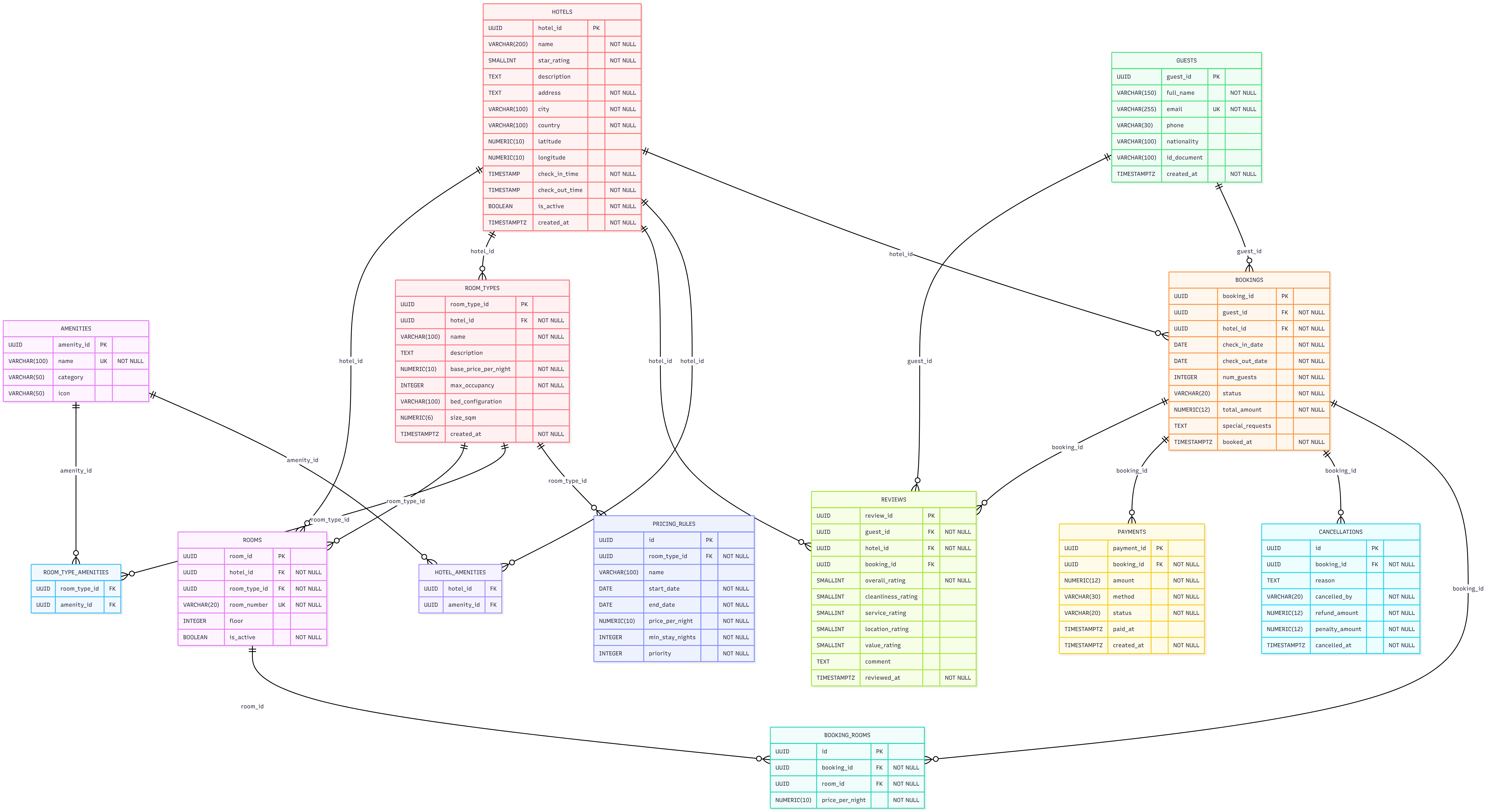
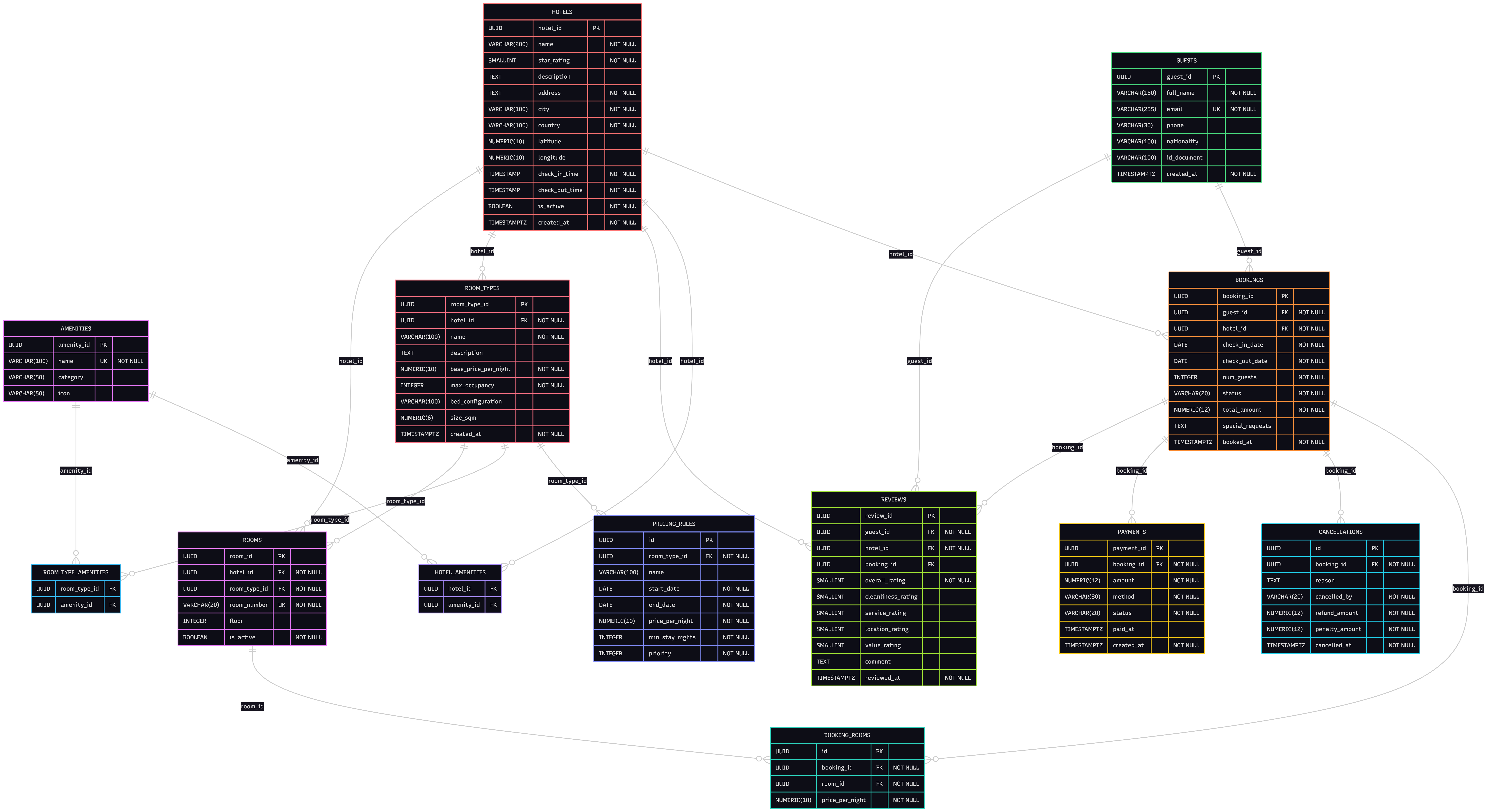
The bookings → booking_rooms → rooms chain is the heart of the model. A guest books a hotel for a date range, then specific physical rooms are assigned via booking_rooms. This separation is what makes availability checking, room swaps, and per-room-night pricing all possible.
Step 5: Example Queries
Query 1 — Find Available Hotels by City and Dates
An availability search is the most performance-critical query in any booking platform. This uses a NOT IN subquery to exclude rooms already booked during the requested window, then groups by hotel to show only properties with at least one free room.
SELECT
  h.hotel_id,
  h.name,
  h.star_rating,
  h.city,
  MIN(rt.base_price_per_night)    AS from_price_per_night,
  COUNT(DISTINCT r.room_id)       AS available_rooms
FROM hotels h
JOIN room_types rt ON h.hotel_id = rt.hotel_id
JOIN rooms r       ON rt.room_type_id = r.room_type_id
WHERE h.city      = 'Paris'
  AND h.is_active  = TRUE
  AND r.is_active  = TRUE
  AND r.room_id NOT IN (
    SELECT br.room_id
    FROM booking_rooms br
    JOIN bookings b ON br.booking_id = b.booking_id
    WHERE b.status NOT IN ('CANCELLED', 'NO_SHOW')
      AND b.check_in_date  < '2026-07-10'  -- requested check-out
      AND b.check_out_date > '2026-07-05'  -- requested check-in
  )
GROUP BY h.hotel_id, h.name, h.star_rating, h.city
HAVING COUNT(DISTINCT r.room_id) > 0
ORDER BY h.star_rating DESC, from_price_per_night ASC;
Analyst Tip: The overlap condition
check_in < requested_out AND check_out > requested_inis the standard interval overlap test. A booking from the 6th to the 8th does NOT conflict with a request for the 8th to the 10th — check-out day is free for the next guest.
Query 2 — Room Types with Their Amenities
STRING_AGG aggregates all amenity names for each room type into a single readable string, which is exactly what you'd return to a search results page.
SELECT
  rt.name               AS room_type,
  rt.base_price_per_night,
  rt.max_occupancy,
  rt.bed_configuration,
  rt.size_sqm,
  STRING_AGG(a.name, ', ' ORDER BY a.category, a.name) AS amenities
FROM room_types rt
LEFT JOIN room_type_amenities rta ON rt.room_type_id = rta.room_type_id
LEFT JOIN amenities a             ON rta.amenity_id  = a.amenity_id
WHERE rt.hotel_id = 'your-hotel-uuid-here'
GROUP BY rt.room_type_id, rt.name, rt.base_price_per_night,
         rt.max_occupancy, rt.bed_configuration, rt.size_sqm
ORDER BY rt.base_price_per_night ASC;
Query 3 — Effective Price for a Given Date (Seasonal Pricing)
The pricing engine works by checking for pricing_rules that cover the target date, sorting by priority DESC, and falling back to base_price_per_night if no rule matches. A correlated subquery handles the priority logic neatly.
SELECT
  rt.name                 AS room_type,
  rt.base_price_per_night AS base_price,
  COALESCE(
    (
      SELECT pr.price_per_night
      FROM pricing_rules pr
      WHERE pr.room_type_id = rt.room_type_id
        AND '2026-12-25' BETWEEN pr.start_date AND pr.end_date
      ORDER BY pr.priority DESC
      LIMIT 1
    ),
    rt.base_price_per_night
  )                        AS effective_price_tonight
FROM room_types rt
WHERE rt.hotel_id = 'your-hotel-uuid-here'
ORDER BY effective_price_tonight ASC;
Query 4 — Guest Booking History
A complete stay history per guest, aggregating the assigned room numbers and computing the number of nights from the date difference.
SELECT
  b.booking_id,
  h.name                                         AS hotel_name,
  h.city,
  h.star_rating,
  b.check_in_date,
  b.check_out_date,
  (b.check_out_date - b.check_in_date)           AS nights,
  b.num_guests,
  b.status,
  b.total_amount,
  STRING_AGG(r.room_number, ', ' ORDER BY r.room_number) AS rooms_assigned
FROM bookings b
JOIN hotels h        ON b.hotel_id   = h.hotel_id
JOIN booking_rooms br ON b.booking_id = br.booking_id
JOIN rooms r         ON br.room_id   = r.room_id
WHERE b.guest_id = 'your-guest-uuid-here'
GROUP BY b.booking_id, h.name, h.city, h.star_rating,
         b.check_in_date, b.check_out_date, b.num_guests, b.status, b.total_amount
ORDER BY b.check_in_date DESC;
Query 5 — Top-Rated Hotels by City
Multi-category averages give a richer picture than a single score. HAVING COUNT >= 5 filters out hotels with too few reviews to be statistically meaningful.
SELECT
  h.name,
  h.city,
  h.star_rating,
  ROUND(AVG(rv.overall_rating),     2) AS avg_overall,
  ROUND(AVG(rv.cleanliness_rating), 2) AS avg_cleanliness,
  ROUND(AVG(rv.service_rating),     2) AS avg_service,
  ROUND(AVG(rv.location_rating),    2) AS avg_location,
  ROUND(AVG(rv.value_rating),       2) AS avg_value,
  COUNT(rv.review_id)                  AS total_reviews
FROM reviews rv
JOIN hotels h ON rv.hotel_id = h.hotel_id
WHERE h.city = 'Paris'
GROUP BY h.hotel_id, h.name, h.city, h.star_rating
HAVING COUNT(rv.review_id) >= 5
ORDER BY avg_overall DESC, total_reviews DESC
LIMIT 10;
Query 6 — Monthly Revenue with Refund Breakdown
This query calculates both gross revenue and net revenue (after refunds) per month. The LEFT JOIN on cancellations ensures non-cancelled bookings still appear with NULL refund amounts, which COALESCE converts to 0.
SELECT
  DATE_TRUNC('month', p.paid_at)::DATE          AS month,
  COUNT(DISTINCT p.booking_id)                   AS paid_bookings,
  SUM(p.amount)                                  AS gross_revenue,
  COALESCE(SUM(c.refund_amount), 0)              AS total_refunds,
  SUM(p.amount) - COALESCE(SUM(c.refund_amount), 0) AS net_revenue
FROM payments p
JOIN bookings b     ON p.booking_id = b.booking_id
LEFT JOIN cancellations c ON b.booking_id = c.booking_id
WHERE p.status  = 'COMPLETED'
  AND b.hotel_id = 'your-hotel-uuid-here'
  AND p.paid_at >= NOW() - INTERVAL '12 months'
GROUP BY month
ORDER BY month DESC;
Query 7 — Daily Occupancy Rate for a Month
generate_series creates a row for every day in the target month. For each day, we count rooms that have an active booking covering it, then divide by the total room count. This is the kind of query you'd feed directly into an occupancy heatmap dashboard.
WITH date_range AS (
  SELECT generate_series(
    '2026-06-01'::DATE,
    '2026-06-30'::DATE,
    INTERVAL '1 day'
  )::DATE AS stay_date
),
total_rooms AS (
  SELECT COUNT(*) AS total
  FROM rooms
  WHERE hotel_id = 'your-hotel-uuid-here'
    AND is_active = TRUE
),
occupied_per_day AS (
  SELECT
    d.stay_date,
    COUNT(DISTINCT br.room_id) AS occupied_rooms
  FROM date_range d
  LEFT JOIN bookings b
    ON  b.hotel_id      = 'your-hotel-uuid-here'
    AND b.check_in_date  <= d.stay_date
    AND b.check_out_date  > d.stay_date
    AND b.status NOT IN ('CANCELLED', 'NO_SHOW')
  LEFT JOIN booking_rooms br ON b.booking_id = br.booking_id
  GROUP BY d.stay_date
)
SELECT
  o.stay_date,
  o.occupied_rooms,
  t.total                                                   AS total_rooms,
  ROUND(o.occupied_rooms * 100.0 / NULLIF(t.total, 0), 1)  AS occupancy_pct
FROM occupied_per_day o
CROSS JOIN total_rooms t
ORDER BY o.stay_date;
Extensibility
| Feature | Extension |
|---|---|
| Loyalty programs | Add a loyalty_accounts table (points balance, tier) and a loyalty_transactions table crediting points per completed stay |
| Multi-currency | Add a currency column to payments and a fx_rates table; store all total_amount values in a base currency |
| Room service | Add room_service_orders and room_service_items tables linked to an active booking |
| Group bookings | Add a group_reservations table that aggregates multiple bookings under one corporate or event contract |
| Maintenance | Add a room_maintenance table (reason, start/end date) and exclude those rooms from availability queries |
| Channel management | Add a booking_source column to bookings (e.g., 'DIRECT', 'BOOKING_COM', 'EXPEDIA') for attribution reporting |
DBA Tip: For high-traffic availability searches, consider maintaining a materialized view or a denormalized
room_availabilitytable that's updated on booking insert/update via a trigger. A full availability scan across all bookings can become expensive at scale without it.
Summary
We've designed a complete hotel booking schema in PostgreSQL covering:
- A three-layer inventory model —
hotels → room_types → rooms— that supports individual room assignment, maintenance tracking, and accurate occupancy reporting - Dual amenity junction tables distinguishing hotel-level amenities (pool, parking) from room-level amenities (minibar, balcony)
- A priority-based pricing engine via
pricing_ruleswhere seasonal and promotional rates override the base price, with higher-priority rules winning - Locked-in pricing in
booking_rooms.price_per_nightso historical booking values are never affected by future price changes - Multi-category reviews with individual scores for cleanliness, service, location, and value — one review enforced per booking via a
UNIQUEconstraint - Production queries including interval-overlap availability search,
generate_seriesoccupancy rates, and monthly net revenue with refund deduction
Whether you're building the next hotel platform or studying how real-world booking systems manage inventory and pricing, this schema gives you a solid, extensible foundation to work from.
Try this schema in a live sandbox
Create a free SQLExplain account and land directly in a sandbox pre-loaded with the Hotel Booking Schema from this post — no password, no setup.