SQLExplain
Designing an Event Ticketing Database Schema in PostgreSQL

Event ticketing platforms handle a surprisingly rich data model: venues with physical capacity, organiser profiles, per-event ticket classes with their own inventory, payment records, check-in scanning, and post-event reviews. In this guide we'll design a clean PostgreSQL schema for a platform similar to Eventbrite or Ticketmaster.
What we'll cover:
- Core entities and their relationships
- Full PostgreSQL DDL (10 tables + indexes)
- ASCII ER diagram
- Five production-relevant example queries
- Ideas for extending the schema
Step 1: Identify the Entities
| Table | Purpose |
|---|---|
users | All platform participants — attendees, organizers, and admins in a single table with a role column |
venues | Event locations with address, city, and total capacity |
organizer_profiles | Extended profile for users with the ORGANIZER role (business name, verification status) |
categories | Event type taxonomy (Music, Tech, Sports, Comedy, …) |
events | Core event record linked to an organiser, venue, and category with a status lifecycle |
ticket_types | Ticket classes per event (Standard, VIP, Early Bird) with individual pricing and inventory |
tickets | Individual ticket purchases — one row per ticket with a QR code token and status |
payments | Payment method and result for each ticket purchase |
attendees | Check-in record created when a ticket is scanned at the door |
reviews | Post-event ratings and comments — one per user per event |
Step 2: Define the Relationships
- A
usersrecord withrole = 'ORGANIZER'links to oneorganizer_profilesrow and can create manyevents - Each
eventis hosted at onevenueand belongs to onecategory - An event has one or more
ticket_types, each with its own price, quantity, and sale window - A customer purchases a
ticketof a specificticket_type; each ticket has exactly onepayment - When a ticket is scanned at the venue, an
attendeesrow is inserted for that ticket - After the event, an attendee may leave one
reviewper event (enforced by aUNIQUEconstraint)
Step 3: PostgreSQL DDL
Key design decisions:
- Single
userstable with arolecolumn — avoids a separateorganizerstable that duplicatesuserscolumns organizer_profilesas a profile extension — keeps organiser-specific fields (business name, verification) separate without splitting the auth recordticket_types.quantity_sold— a denormalised counter updated on every purchase; faster than aCOUNT(*)subquery on high-traffic listing pagesCHECK (quantity_sold <= quantity_total)— a hard guard at the DB layer; combine withSELECT ... FOR UPDATEin the application to prevent oversellingtickets.qr_code UNIQUE— a signed token stored at purchase; the scanner just needs a single lookupTIMESTAMPTZfor all event times — critical for multi-timezone eventsVARCHAR + CHECKfor status columns — noALTER TYPEmigrations when new statuses are added
-- Enable pgcrypto for UUID generation
CREATE EXTENSION IF NOT EXISTS pgcrypto;

-- ──────────────────────────────────────────────────────────────────
-- USERS
-- ──────────────────────────────────────────────────────────────────
CREATE TABLE users (
  user_id    UUID         PRIMARY KEY DEFAULT gen_random_uuid(),
  full_name  VARCHAR(100) NOT NULL,
  email      VARCHAR(255) UNIQUE NOT NULL,
  phone      VARCHAR(20),
  role       VARCHAR(20)  NOT NULL DEFAULT 'ATTENDEE'
               CHECK (role IN ('ATTENDEE','ORGANIZER','ADMIN')),
  created_at TIMESTAMPTZ  NOT NULL DEFAULT NOW()
);

-- ──────────────────────────────────────────────────────────────────
-- VENUES
-- ──────────────────────────────────────────────────────────────────
CREATE TABLE venues (
  venue_id  UUID         PRIMARY KEY DEFAULT gen_random_uuid(),
  name      VARCHAR(150) NOT NULL,
  address   TEXT         NOT NULL,
  city      VARCHAR(100),
  country   VARCHAR(100),
  capacity  INT          NOT NULL,
  latitude  NUMERIC(10,8),
  longitude NUMERIC(11,8)
);

-- ──────────────────────────────────────────────────────────────────
-- ORGANIZER PROFILES  (extends users where role = 'ORGANIZER')
-- ──────────────────────────────────────────────────────────────────
CREATE TABLE organizer_profiles (
  organizer_id      UUID         PRIMARY KEY DEFAULT gen_random_uuid(),
  user_id           UUID         NOT NULL UNIQUE REFERENCES users(user_id) ON DELETE CASCADE,
  organization_name VARCHAR(150) NOT NULL,
  website           VARCHAR(500),
  bio               TEXT,
  is_verified       BOOLEAN      NOT NULL DEFAULT FALSE,
  created_at        TIMESTAMPTZ  NOT NULL DEFAULT NOW()
);

-- ──────────────────────────────────────────────────────────────────
-- CATEGORIES
-- ──────────────────────────────────────────────────────────────────
CREATE TABLE categories (
  category_id UUID         PRIMARY KEY DEFAULT gen_random_uuid(),
  name        VARCHAR(100) UNIQUE NOT NULL
);

-- ──────────────────────────────────────────────────────────────────
-- EVENTS
-- ──────────────────────────────────────────────────────────────────
CREATE TABLE events (
  event_id     UUID         PRIMARY KEY DEFAULT gen_random_uuid(),
  organizer_id UUID         NOT NULL REFERENCES organizer_profiles(organizer_id) ON DELETE CASCADE,
  venue_id     UUID         NOT NULL REFERENCES venues(venue_id),
  category_id  UUID         REFERENCES categories(category_id),
  title        VARCHAR(200) NOT NULL,
  description  TEXT,
  banner_url   VARCHAR(500),
  status       VARCHAR(20)  NOT NULL DEFAULT 'DRAFT'
                 CHECK (status IN ('DRAFT','PUBLISHED','CANCELLED','COMPLETED')),
  start_time   TIMESTAMPTZ  NOT NULL,
  end_time     TIMESTAMPTZ  NOT NULL,
  created_at   TIMESTAMPTZ  NOT NULL DEFAULT NOW(),
  CHECK (end_time > start_time)
);

-- ──────────────────────────────────────────────────────────────────
-- TICKET TYPES  (VIP, Standard, Early Bird, etc.)
-- ──────────────────────────────────────────────────────────────────
CREATE TABLE ticket_types (
  ticket_type_id UUID          PRIMARY KEY DEFAULT gen_random_uuid(),
  event_id       UUID          NOT NULL REFERENCES events(event_id) ON DELETE CASCADE,
  name           VARCHAR(100)  NOT NULL,
  description    TEXT,
  price          NUMERIC(10,2) NOT NULL,
  quantity_total INT           NOT NULL,
  quantity_sold  INT           NOT NULL DEFAULT 0,
  sale_starts_at TIMESTAMPTZ,
  sale_ends_at   TIMESTAMPTZ,
  CHECK (quantity_sold <= quantity_total)
);

-- ──────────────────────────────────────────────────────────────────
-- TICKETS  (individual purchases)
-- ──────────────────────────────────────────────────────────────────
CREATE TABLE tickets (
  ticket_id      UUID         PRIMARY KEY DEFAULT gen_random_uuid(),
  ticket_type_id UUID         NOT NULL REFERENCES ticket_types(ticket_type_id),
  user_id        UUID         NOT NULL REFERENCES users(user_id) ON DELETE CASCADE,
  qr_code        VARCHAR(500) UNIQUE,
  status         VARCHAR(20)  NOT NULL DEFAULT 'ACTIVE'
                   CHECK (status IN ('ACTIVE','USED','CANCELLED','REFUNDED')),
  purchased_at   TIMESTAMPTZ  NOT NULL DEFAULT NOW()
);

-- ──────────────────────────────────────────────────────────────────
-- PAYMENTS  (one per ticket)
-- ──────────────────────────────────────────────────────────────────
CREATE TABLE payments (
  payment_id     UUID          PRIMARY KEY DEFAULT gen_random_uuid(),
  ticket_id      UUID          NOT NULL UNIQUE REFERENCES tickets(ticket_id) ON DELETE CASCADE,
  user_id        UUID          NOT NULL REFERENCES users(user_id),
  amount         NUMERIC(10,2) NOT NULL,
  currency       CHAR(3)       NOT NULL DEFAULT 'USD',
  payment_method VARCHAR(20)   NOT NULL
                   CHECK (payment_method IN ('CARD','PAYPAL','APPLE_PAY','GOOGLE_PAY','BANK_TRANSFER')),
  payment_status VARCHAR(20)   NOT NULL DEFAULT 'PENDING'
                   CHECK (payment_status IN ('PENDING','COMPLETED','FAILED','REFUNDED')),
  processed_at   TIMESTAMPTZ   NOT NULL DEFAULT NOW()
);

-- ──────────────────────────────────────────────────────────────────
-- ATTENDEES  (check-in record — created when ticket is scanned)
-- ──────────────────────────────────────────────────────────────────
CREATE TABLE attendees (
  attendee_id   UUID        PRIMARY KEY DEFAULT gen_random_uuid(),
  ticket_id     UUID        NOT NULL UNIQUE REFERENCES tickets(ticket_id) ON DELETE CASCADE,
  event_id      UUID        NOT NULL REFERENCES events(event_id),
  user_id       UUID        NOT NULL REFERENCES users(user_id),
  checked_in_at TIMESTAMPTZ,
  checked_in_by UUID        REFERENCES users(user_id)  -- staff who scanned the QR code
);

-- ──────────────────────────────────────────────────────────────────
-- REVIEWS  (one per user per event)
-- ──────────────────────────────────────────────────────────────────
CREATE TABLE reviews (
  review_id  UUID        PRIMARY KEY DEFAULT gen_random_uuid(),
  event_id   UUID        NOT NULL REFERENCES events(event_id) ON DELETE CASCADE,
  user_id    UUID        NOT NULL REFERENCES users(user_id) ON DELETE CASCADE,
  rating     SMALLINT    NOT NULL CHECK (rating BETWEEN 1 AND 5),
  comment    TEXT,
  created_at TIMESTAMPTZ NOT NULL DEFAULT NOW(),
  UNIQUE (event_id, user_id)
);

-- ──────────────────────────────────────────────────────────────────
-- INDEXES
-- ──────────────────────────────────────────────────────────────────
CREATE INDEX idx_events_organizer   ON events(organizer_id);
CREATE INDEX idx_events_venue       ON events(venue_id);
CREATE INDEX idx_events_category    ON events(category_id);
CREATE INDEX idx_events_start_time  ON events(start_time);
CREATE INDEX idx_events_status      ON events(status);
CREATE INDEX idx_ticket_types_event ON ticket_types(event_id);
CREATE INDEX idx_tickets_user       ON tickets(user_id);
CREATE INDEX idx_tickets_type       ON tickets(ticket_type_id);
CREATE INDEX idx_attendees_event    ON attendees(event_id);
CREATE INDEX idx_reviews_event      ON reviews(event_id);
DBA Tip: The
CHECK (quantity_sold <= quantity_total)constraint is a safety net, but it cannot prevent two concurrent transactions both readingquantity_sold = 99(capacity 100) and both inserting. In your application, wrap ticket purchases in a transaction withSELECT quantity_sold FROM ticket_types WHERE ticket_type_id = $1 FOR UPDATE— the row lock prevents the race condition.
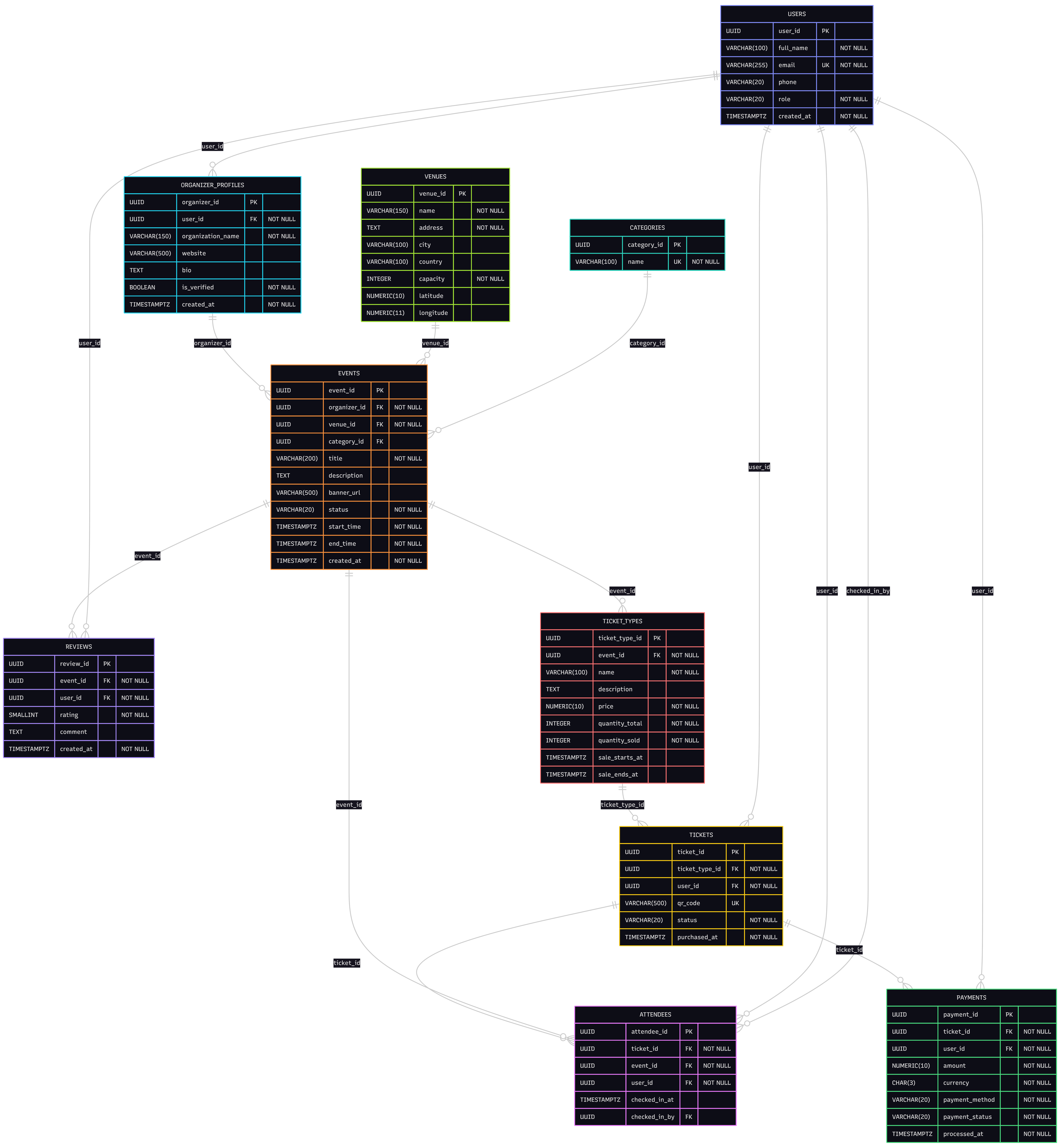
Step 4: ER Diagram Overview
Scroll or pinch to zoom · drag to pan · double-click to zoom in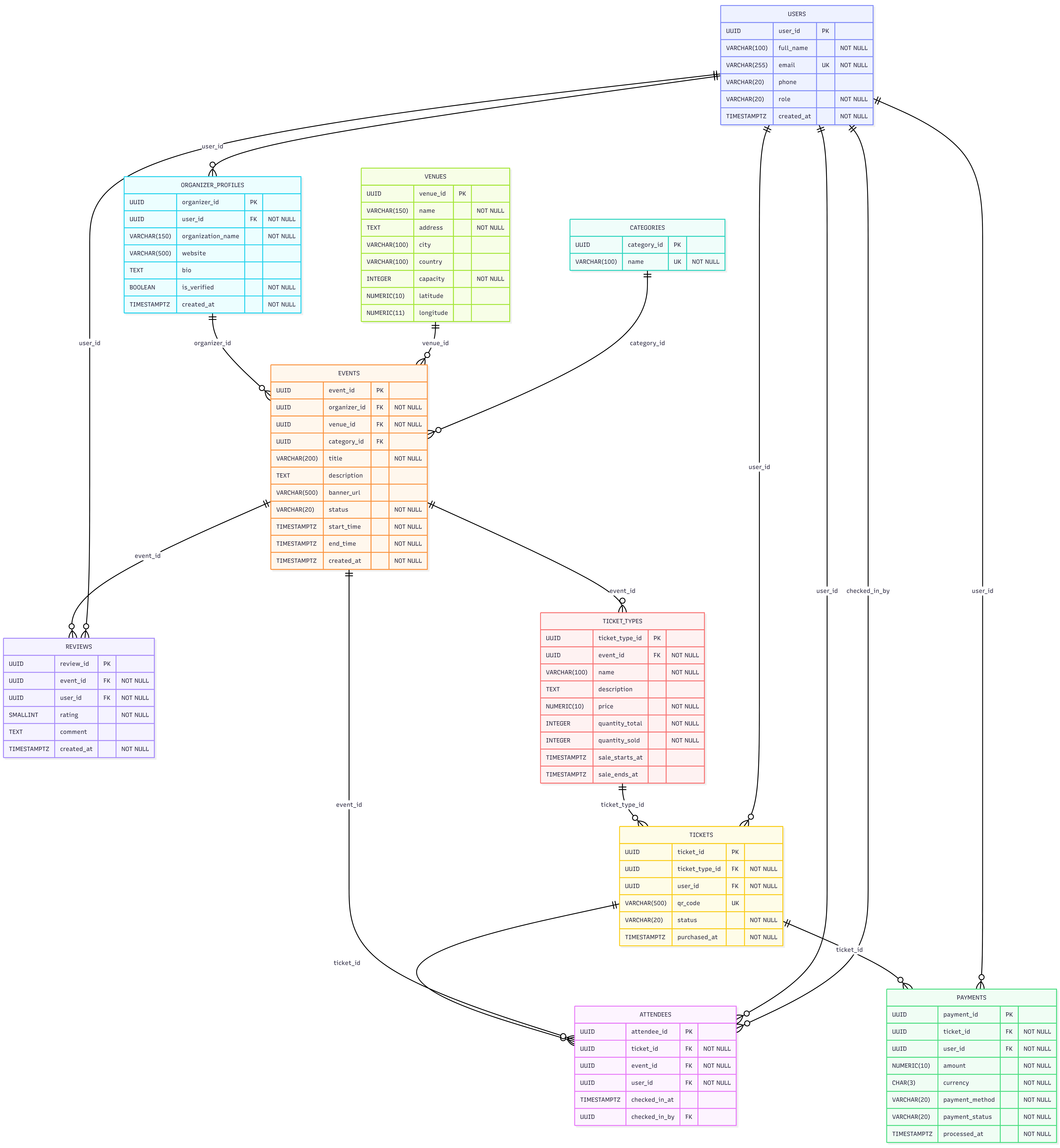
Step 5: Example Queries
1. Upcoming Events in the Next 30 Days
SELECT
  e.event_id,
  e.title,
  e.start_time,
  v.name               AS venue_name,
  v.city,
  op.organization_name AS organizer,
  c.name               AS category
FROM events e
JOIN organizer_profiles op ON e.organizer_id = op.organizer_id
JOIN venues v              ON e.venue_id      = v.venue_id
LEFT JOIN categories c     ON e.category_id   = c.category_id
WHERE e.status     = 'PUBLISHED'
  AND e.start_time BETWEEN NOW() AND NOW() + INTERVAL '30 days'
ORDER BY e.start_time;
DBA Tip: A composite index on
(status, start_time)lets PostgreSQL filter by status (low cardinality) first and then scan the time range without a full table scan — worth adding for large event tables.
2. Ticket Sales and Capacity Utilisation per Event
Show how sold-out each event is across all ticket types:
SELECT
  e.title,
  e.start_time,
  SUM(tt.quantity_total)  AS total_capacity,
  SUM(tt.quantity_sold)   AS total_sold,
  ROUND(
    100.0 * SUM(tt.quantity_sold) / NULLIF(SUM(tt.quantity_total), 0),
    1
  )                       AS sold_pct
FROM events e
JOIN ticket_types tt ON e.event_id = tt.event_id
WHERE e.status IN ('PUBLISHED','COMPLETED')
GROUP BY e.event_id, e.title, e.start_time
ORDER BY sold_pct DESC;
3. Revenue by Event and Ticket Class
Break revenue down by each ticket class using completed payments only:
SELECT
  e.title            AS event_name,
  tt.name            AS ticket_class,
  COUNT(t.ticket_id) AS tickets_sold,
  tt.price           AS unit_price,
  SUM(p.amount)      AS gross_revenue
FROM tickets t
JOIN ticket_types tt ON t.ticket_type_id = tt.ticket_type_id
JOIN events e        ON tt.event_id       = e.event_id
JOIN payments p      ON t.ticket_id       = p.ticket_id
WHERE t.status        IN ('ACTIVE','USED')
  AND p.payment_status = 'COMPLETED'
GROUP BY e.title, tt.name, tt.price
ORDER BY e.title, gross_revenue DESC;
4. Most Popular Categories by Check-In Count
SELECT
  c.name                     AS category_name,
  COUNT(DISTINCT e.event_id) AS total_events,
  COUNT(a.attendee_id)       AS total_check_ins
FROM categories c
JOIN events e         ON c.category_id = e.category_id
LEFT JOIN attendees a ON e.event_id    = a.event_id
GROUP BY c.name
ORDER BY total_check_ins DESC;
5. Top-Rated Events with Review Breakdown
SELECT
  e.title                                   AS event_name,
  e.start_time::DATE                        AS event_date,
  ROUND(AVG(r.rating), 2)                   AS avg_rating,
  COUNT(r.review_id)                        AS total_reviews,
  COUNT(CASE WHEN r.rating = 5 THEN 1 END)  AS five_star,
  COUNT(CASE WHEN r.rating <= 2 THEN 1 END) AS low_ratings
FROM reviews r
JOIN events e ON r.event_id = e.event_id
GROUP BY e.event_id, e.title, e.start_time
HAVING COUNT(r.review_id) >= 5
ORDER BY avg_rating DESC
LIMIT 10;
Extending the Schema
| Feature | Approach |
|---|---|
| QR code validation | Sign a JWT at purchase and store in tickets.qr_code; validate on scan and UPDATE tickets SET status = 'USED' in a single transaction |
| Discount codes | discount_codes (type, value, usage limit, expiry) + ticket_discounts junction; apply at checkout and store the final amount on payments |
| Reserved seating | seats table per venue with row and number; ticket_seats assigns a seat at purchase with a UNIQUE constraint |
| Waitlist | waitlist rows with a position counter; auto-promote the top-position entry when a ticket is cancelled |
| Group bookings | booking_groups header record; individual tickets share a group_id FK |
| Multi-day events | event_sessions child table for separate day/time slots under one parent event |
Summary
We've designed a complete event ticketing schema in PostgreSQL — 10 normalised tables, targeted indexes, and a set of queries covering the full event lifecycle from discovery and ticket purchase through check-in and post-event review.
The schema handles real-world complexity: per-class ticket inventory with a DB-level oversell guard, flexible organiser profiles without duplicating the users table, and a signed QR code token model that keeps check-in fast. Explore the schema interactively on SQLExplain.ai.
Try this schema in a live sandbox
Create a free SQLExplain account and land directly in a sandbox pre-loaded with the Event Ticket Schema from this post — no password, no setup.